Archiving Projects
Clear finished work out of your dashboard and free up project slots — without losing a single task, comment, or file.

Archiving takes a project out of your dashboard without destroying it. As Atarim puts it, archiving removes the project from your dashboard but keeps all tasks intact — when restored, everything will be as you left it.
It solves two problems at once: a project list cluttered with work that finished months ago, and a plan whose project slots are all spoken for.
Archiving is not deleting
This is the distinction that matters, and it is the reason archiving should be your default for anything you are unsure about.
| Archiving | Deleting | |
|---|---|---|
| Tasks and comments | Kept in full | Removed permanently |
| Reversible | Yes, in two clicks | No |
| Frees a project slot | Yes | Yes |
| Appears in your dashboard | No, until restored | Never again |
| Confirmation required | A single confirmation | Typing a randomly generated number |
Both free up a slot, so there is rarely a reason to delete. Deletion is covered separately. Read Before You Delete.
What is kept while a project is archived
Atarim is explicit that business communications are not deleted, so a project can be reactivated whenever it is needed again.
| What | Status while archived |
|---|---|
| Tasks | Kept exactly as they were, at whatever status they had reached. |
| Comments and feedback | Kept in full, including client conversations. |
| Attachments and screenshots | Kept with their tasks. |
| The project itself | Hidden from the Projects screen, retrievable from the archive. |
| Your project slot | Released back to your plan. |
The trade-off is that the project stops appearing anywhere in your working views while it is archived.
When to archive
The judgement is between finished and merely quiet, because restoring is easy but repeatedly archiving and restoring the same project is not.
| Situation | Archive? |
|---|---|
| Project delivered and signed off | Yes — the clearest case. |
| Client relationship ended | Yes, and keep the record in case they return. |
| You have hit your project limit | Yes — archive your oldest finished work before upgrading. |
| Site handed back to the client | Yes, once you no longer need access. |
| Project paused for a fortnight | No. Leave it — you will only be restoring it shortly. |
| Retainer client, quiet this month | No. Quiet is not finished. |
| Project still has open tasks | Not yet — those tasks vanish from Inbox and Boards while archived. |
Archiving a project
Archiving is done from the project’s own actions menu on the Projects screen, and takes one confirmation.
Instructions:

Archiving several projects at once
Clearing out a year of finished work one project at a time is tedious. Selecting them first lets you archive the lot in one confirmation.
Instructions:

Unarchiving a project
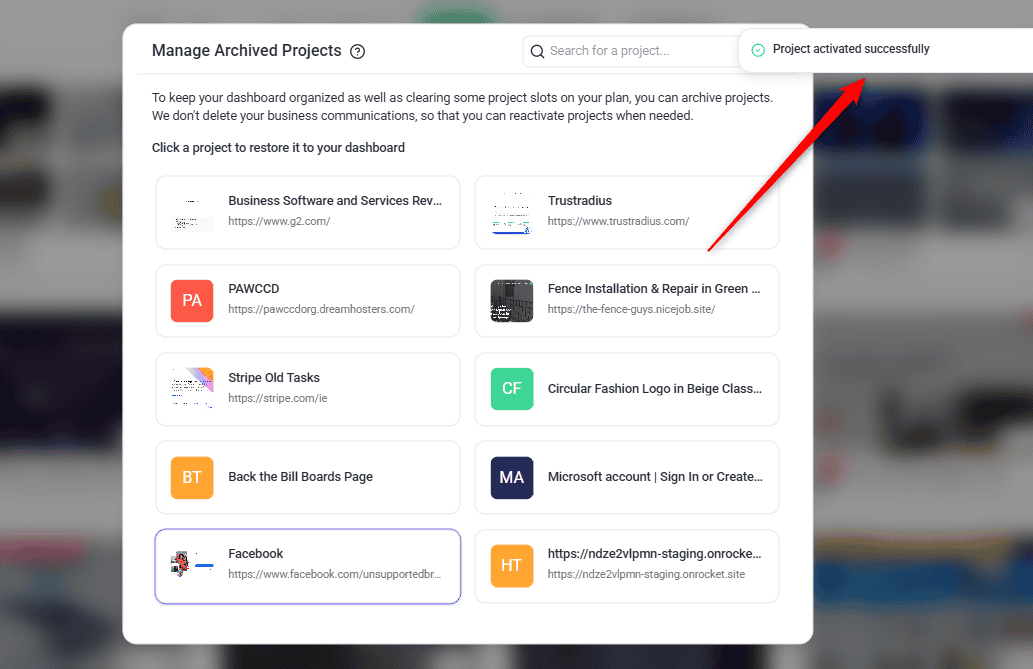
Restoring is deliberately simple, because the whole point of archiving is that it is safe to do. Everything comes back exactly as it was.
Instructions:

Archiving a Client’s Projects
A client folder on the Projects screen is the client’s own workspace rather than an ordinary folder, and it behaves differently: it has no Delete Folder action and no folder-level archive. The only action on it is Disconnect Client, which an Administrator sees. To archive a client’s work, archive each project exactly as you would any other.
The client folder stays on the Projects screen afterwards but shows as empty — archived projects are listed under Archived Projects, which is not organised by folder. Restoring a project puts it back in the client’s folder.
Known limitations
Where archiving stops:
FAQs
Does archiving delete my tasks?
No. Tasks, comments, and files are all kept. When you restore the project, everything is as you left it.
Does archiving free up a project slot?
Yes. That is one of its main purposes — archiving finished work is usually a better first move than upgrading your plan.
How do I get an archived project back?
Open Projects Settings → Archived Projects and select the project. It is restored immediately.
Is there a limit on how many projects I can archive?
Archiving is how you stay within your plan’s limit rather than something the limit applies to, so archive as much finished work as you like.
What happens to the project’s tasks in my Inbox and Boards?
They disappear along with the project, and come back when it is restored. Nothing is lost, but outstanding work becomes invisible — so check for open tasks before archiving.
Can I delete a project straight from the archive?
No. Restore it to the Projects screen first, then delete it from there.
Can clients still see an archived project?
No. An archived project is out of the dashboard until it is restored.
Can I archive a folder?
No. Folders have Delete Folder instead, which keeps the projects and returns them to the Projects screen unfiled. Tick Archive projects with folder if you want them archived at the same time.
Should I archive or delete?
Archive, in almost every case. Both free a project slot, but only archiving is reversible.
Common issues
- A project has disappeared. Check the workspace first, then clear your filters, then look in Archived Projects — archiving is by far the most common explanation.
- Archive is missing from the actions menu. Your role does not carry the permission. An administrator can grant it under Settings → User Permissions.
- “Failed to archive project”. Refresh and try again. If it persists, check you still have permission on that project and contact Support.
- “Failed to activate project”. You may be at your plan’s project limit. Archive something else to free a slot, then restore again.
- The archive list is empty. Nothing has been archived in this workspace. Check whether you archived it from a different one.
- A task has vanished from your Inbox or Boards. Its project may have been archived. Check Archived Projects — restoring the project brings its tasks back too.
- You want to delete an archived project. Restore it first, then delete it from the Projects screen. There is no delete action inside the archive.
- You restored a project by accident. No harm done — archive it again from its actions menu.
- Tasks look different after restoring. They should be exactly as you left them. If something is genuinely missing, contact support@atarim.io, which the archive dialog itself points you to.
Conclusion
Archiving is the tidying tool that costs nothing. It clears your dashboard, releases a project slot, and keeps every task and client conversation exactly where you left it — which makes it the right answer almost any time you are tempted to delete.
If you are archiving to make room, it is worth knowing how project limits work on your plan.
Tips & best practices
- Archive rather than delete unless you are certain. Both free a slot, but only one can be undone.
- Make it a habit at project sign-off rather than a clear-out you do once a year under pressure.
- Sort by Oldest Projects First before a clear-out — your archive candidates will be grouped together.
- Use multi-select to archive a whole finished client in one confirmation.
- Check the archive before concluding a project has been deleted. It is the most common explanation for a missing project — and for a task that has vanished from your Inbox.
- Clear or reassign open tasks before archiving, so nothing outstanding disappears from the team’s lists.
- Remember restoring takes a slot back, so free one first if you are already at your limit.