Atarim for Marketing Managers: Integrating Atarim into Campaign Management
Run landing page reviews, stakeholder sign-off, and launch deadlines in one place — instead of a spreadsheet, a thread, and a meeting.
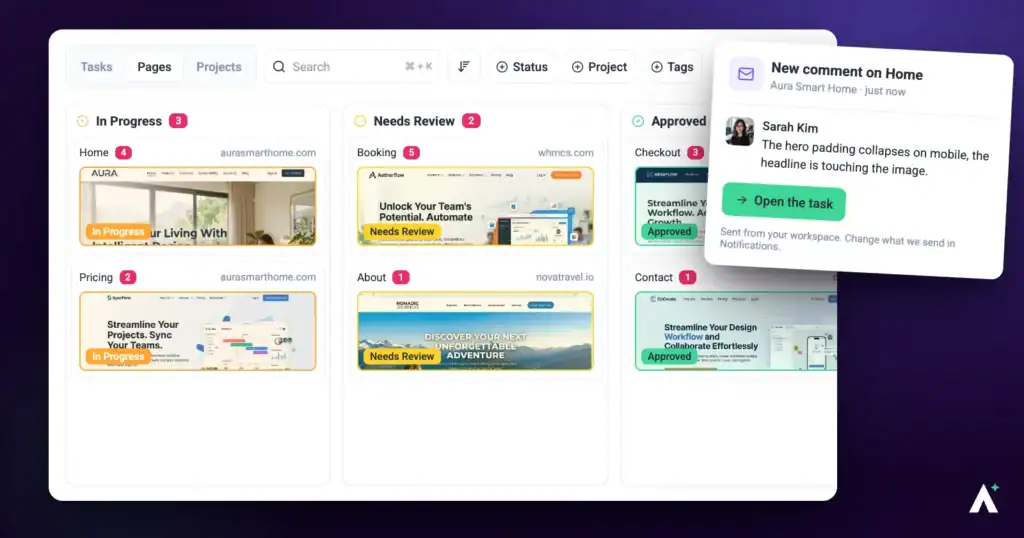
Campaign work fails on coordination, not on craft. Legal wants a wording change, the designer already shipped the version legal was looking at, the CMO approves something in a meeting nobody minuted, and launch day arrives with three people holding different versions of the truth. Atarim collapses that by putting review, deadlines, and sign-off on the campaign asset itself.
Feedback, deadlines, and sign-off attached to the page itself rather than scattered across tools.
Campaign work fails on coordination, not on craft. Legal wants a wording change, the designer already shipped the version legal was looking at, the CMO approves something in a meeting nobody minuted, and launch day arrives with three people holding different versions of the truth.
Atarim collapses that by putting review, deadlines, and sign-off on the campaign asset itself. This guide covers the parts of the product that matter when you are the person accountable for the launch date.
Structuring Campaigns
The first decision is what a project represents. Two patterns work, and mixing them is what creates mess.
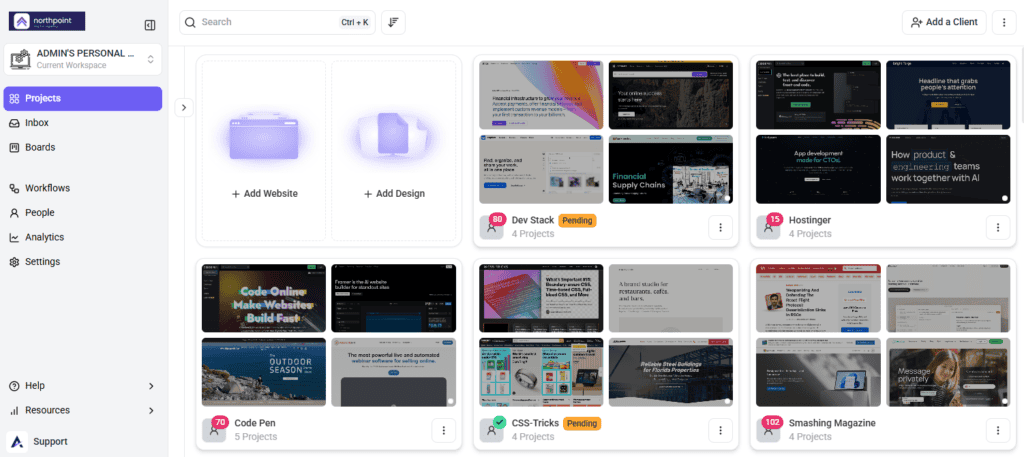
Folders group related projects, which is what keeps a portfolio of campaigns navigable rather than a flat list of thirty.
Running a Review on Campaign Assets
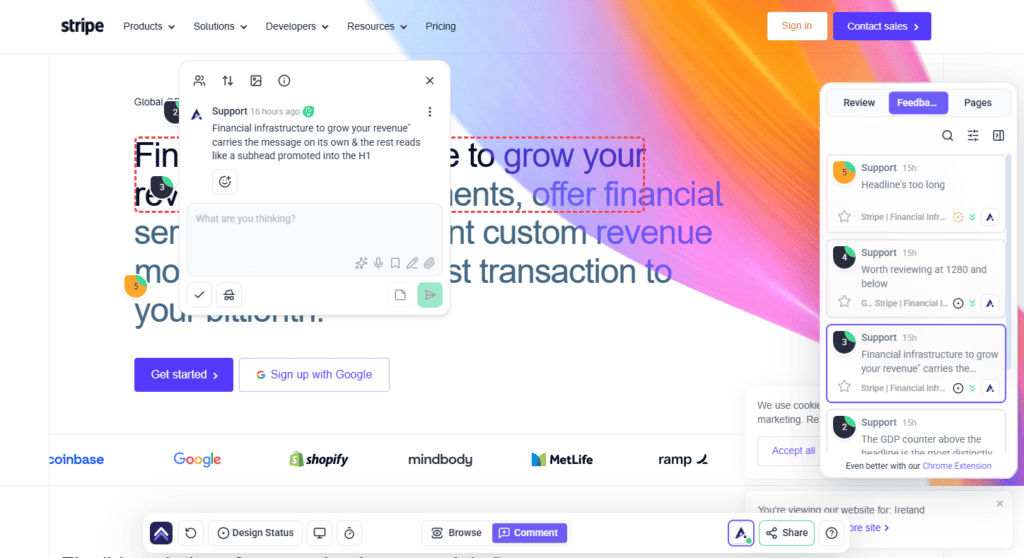
Reviewers open the page and click the thing they are commenting on. Each comment becomes a task carrying the page, the element, the browser, the viewport, and a screenshot of what the reviewer saw.
For you that removes the two most expensive parts of campaign review: working out what someone meant, and working out whether it has been done.
Tracking Campaign Deadlines
Project stages give a campaign a visible timeline. The panel is reached from the bottom bar, with the tooltip “track project stages and deadlines”, and it is headed Project Stages and Deadlines.
| What it shows | Why it matters to you |
|---|---|
| Active Stage | What the campaign is currently in, so nobody has to ask. |
| Due date | When the current stage is expected to close. |
| Time remaining | How long is left, in plain terms rather than a date to calculate from. |
| Overdue | How far past due something is — the number you take to a status meeting. |
| Completed Stages | What has already shipped, each marked Complete. |
Sharing a Campaign for Review
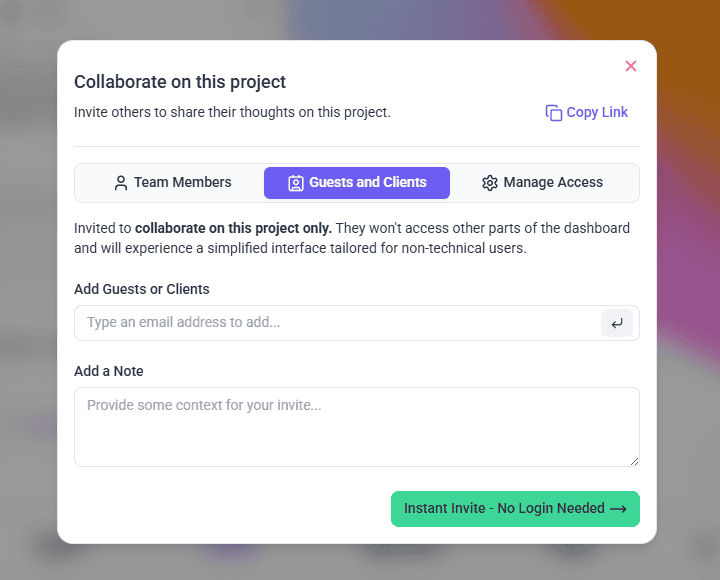
Reviewers reach the work through Share, available on the project and from the bottom bar while you are on a page. The window separates the two audiences you deal with.
Inviting Stakeholders and Clients
Guests need no account, so an email address is all it takes to bring someone in.
Instructions:
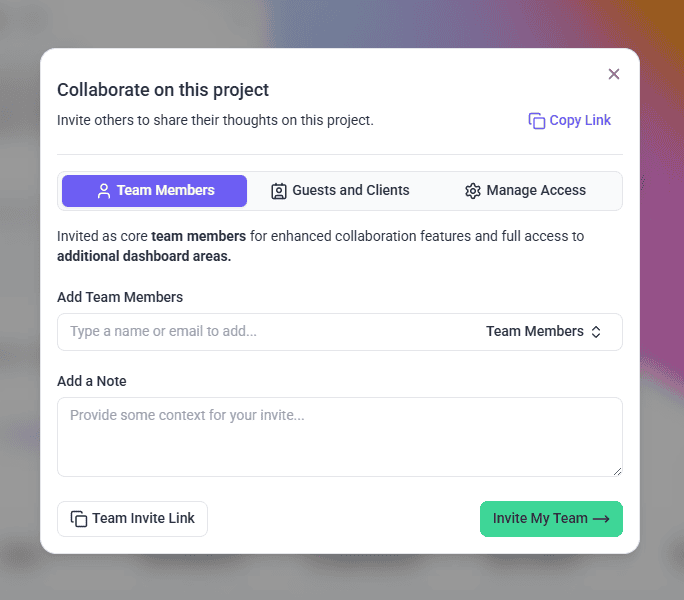
Inviting Your Own Team
Team invitations sit in a separate section from guests, because the access they grant is different.
Instructions:
Controlling Who Can Open the Project
Under General Access, the question Who can view this? offers two settings.
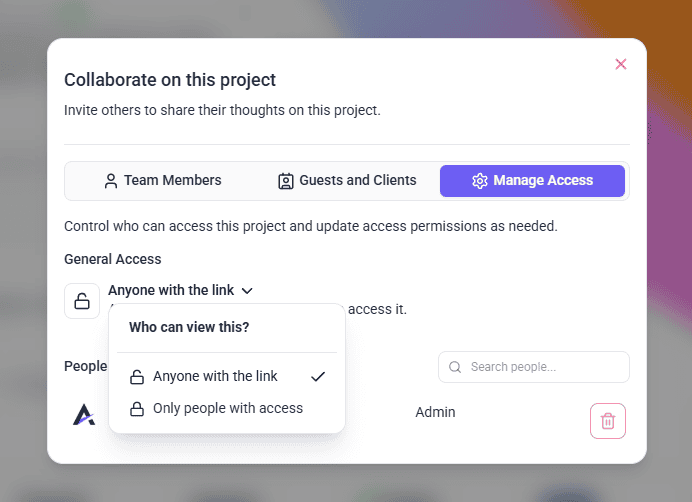
A separate Enable Guest Mode option launches Atarim in Comment Mode for guests by default, which removes a step for reviewers who would otherwise land in Browse mode and wonder why clicking does nothing.
Copy Link gives you the link to paste into a brief or a calendar invite, and confirms with Copied!. Everyone already invited is listed under People with Access, searchable, with controls to change their access level, resend an invitation, or remove them. The project owner cannot be removed.
Setting Up a Campaign Timeline
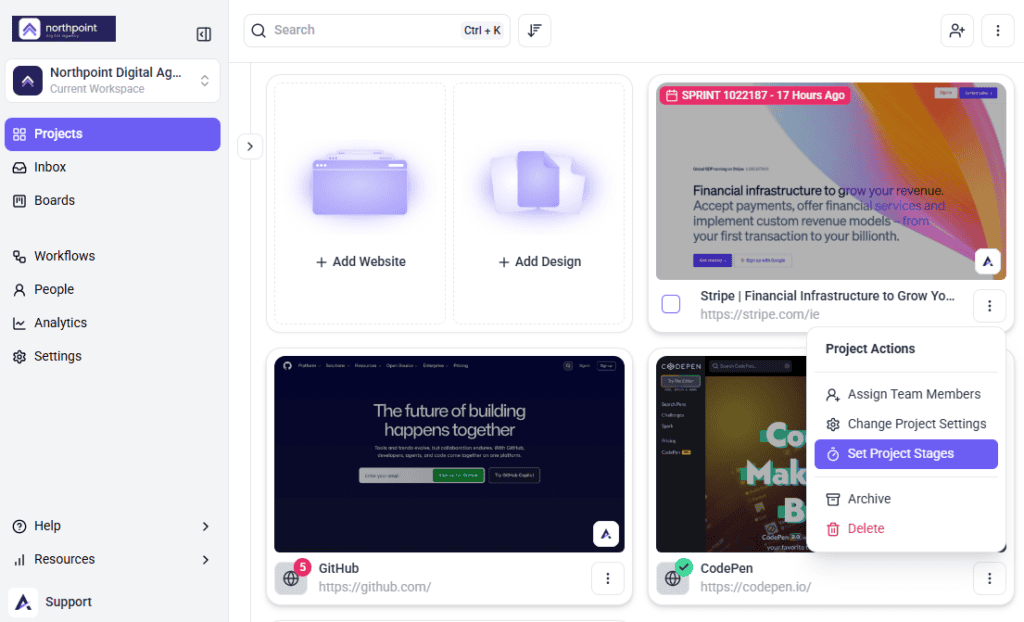
Stages are created from the project itself, through the project actions menu.
Instructions:
Organising Work with Tags
Tags cut across projects, which makes them the right tool for anything that is not a project boundary — a channel, a market, a campaign phase, a legal review batch.
Tags are added on a task, under Add Tags, with the field prompting you to type and press enter to create a new tag. Where none exist yet, it invites you to create your first tag.
Seeing the Campaign Pipeline
Boards give you the view a list cannot: where everything is at once. Two boards are available from the board switcher.
| Board | Use it for |
|---|---|
| Status Board | Where work stands — what is open, in progress, waiting on review, and done. |
| Priority Board | What matters most, which is the view for deciding what gets dropped when a date is at risk. |
Using the InnerCircle on Campaign Pages
Atarim’s AI review team can pass over a page before your stakeholders do. Two members are directly relevant to campaign work, and all of them can be switched on or off individually.
| Agent | Reviews for |
|---|---|
| Lexi | Content and tone — the copy itself. |
| Index | SEO and performance. |
| Navi | User experience and accessibility. |
| Pixel | Design — layout and visual execution. |
| Glitch | Functionality — things that break. |
| Claro | Clarity, including a strategic overview before the others join. |
Findings come back in the Review tab in the sidebar, listed as subtasks under the review and grouped by the viewport they were found in. Selecting one takes you to it on the page. At least one agent must be enabled for a review to run, and only one review runs at a time.
Getting Sign-Off You Can Point To Later
Page approval turns “yes, that’s fine” into a recorded state on the asset. Approved pages are marked as such, so approval is something you can produce three weeks later rather than something you remember.
Whether a given stakeholder can approve depends on how their access is set up — page status controls are not switched on for client and guest accounts by default. If someone needs to sign work off formally, that has to be arranged deliberately.
Reporting on How the Process Is Working
Analytics measures the review process itself, which is the part of campaign delivery that usually has no numbers attached to it at all.
| Metric | What it tells you |
|---|---|
| Feedback Cycles | How long a round of review actually takes. |
| Avg Task Turnaround | How quickly feedback becomes done work. |
| Guest Response Time | How long stakeholders take to respond — often the real bottleneck. |
| Revisions Per Task | How many passes it takes to land a change. |
| Revision Reduction Rate | Whether that is improving over time. |
| Tasks Completed On Time Percentage | Delivery against the dates you committed to. |
| Client Vs Team Contribution Ratio | How much of the input is coming from your side versus theirs. |
| High Priority Task Percentage | Whether everything is being marked urgent, which means nothing is. |
| Most Active Projects | Where the work is actually concentrated across your campaigns. |
Keeping Internal Conversation Internal
Tasks and comments can be marked internal, which hides them from guests and clients. For campaign work this is what lets your team discuss budget, pushback, and what to concede without any of it landing in a stakeholder’s review.
Automating the Chasing
Workflows handle the follow-up that otherwise lands on you — notifying the right people when a task changes, pushing updates into Slack, or triggering something in another tool through Zapier, Make, or webhooks.
Benefits for a Marketing Manager
| Benefit | In practice |
|---|---|
| One place for feedback | Stakeholder input lands on the asset instead of across email, chat, and meetings. |
| Deadlines everyone can see | Stages put the timeline in front of reviewers rather than in your head. |
| Sign-off that survives | Approval is recorded on the page, not remembered from a call. |
| A defensible launch view | The Priority Board answers what slips, with evidence. |
| Fewer defects reaching stakeholders | An AI pass catches copy, contrast, and broken interactions first. |
| Numbers for a process that had none | Feedback cycle and stakeholder response time become measurable. |
Example Use Cases
| Situation | What to do |
|---|---|
| A product launch page | One project, stages for draft, review, legal, and launch, with stakeholders shared in at the review stage. |
| Legal needs to see everything | Tag the tasks that need legal review so they can be filtered out of the wider list. |
| Stakeholders are not responding | Check Guest Response Time, then automate the nudge rather than chasing manually. |
| Launch week and something must slip | Open the Priority Board and make the call against what is actually there. |
| An executive asks who approved this | Point at the recorded approval on the page. |
| The same campaign runs quarterly | Compare Feedback Cycles and Revisions Per Task between runs to show the process improving. |
Known Limitations
FAQs
Should each campaign be its own project?
For time-boxed campaigns with a launch date, yes. For ongoing work on one property, use a single project with tags and stages instead.
Can stakeholders review without an Atarim account?
Yes. They give a name and email so their comments can be attributed, but no account is required.
How do I show a campaign deadline to reviewers?
Create milestones through Set Project Stages in the project actions menu. The panel then shows the active stage, its due date, and time remaining.
How do I invite a stakeholder who has no Atarim account?
Use Add Guests or Clients in the Share window and send an instant invite — no login needed.
Can I stop the review link being forwarded?
Set Who can view this? to Only people with access instead of Anyone with the link.
Can I get formal sign-off recorded?
Yes, through page approval, where it is included on your plan and enabled for the people approving.
Can my team discuss things stakeholders should not see?
Yes, using internal tasks and notes, where enabled on your plan.
Which board should I use?
The Status Board for day-to-day progress, the Priority Board when deciding what slips.
Can the AI check my campaign copy?
Yes. Lexi reviews content and tone; Index covers SEO and performance.
Does Atarim report on campaign performance?
No. Analytics measures the review and delivery process — cycle times, turnaround, revisions — not marketing results.
Can I automate chasing stakeholders?
Yes, through workflows and notifications, including into Slack or other tools.
Can tags be used across projects?
Yes, which is what makes them useful for channels, markets, and phases that cut across project boundaries.
Common issues
- No stages panel on a project — no milestones exist yet. Use Set Project Stages from the project actions menu.
- Set Project Stages appears locked — project stages are not included on your plan. The menu item shows the minimum plan required.
- A reviewer opened the link and cannot comment — they may be in Browse mode. Turn on Enable Guest Mode so guests land in Comment Mode.
- A stakeholder cannot approve a page — page status is not enabled for client accounts by default, and approvals depend on the plan.
- Tags are not grouping as expected — they were probably typed inconsistently. Spelling and case matter.
- Feedback is still arriving by email — reviewers were sent an export rather than the review link.
- The AI review will not start — enable at least one agent, and wait for any review already running to finish.
- Internal tasks are locked — not included on your plan. Do not assume anything is hidden until it is enabled.
- A stakeholder cannot see the project — they have not been shared in, or they are looking at a different workspace.
- Everything is marked High Priority — check High Priority Task Percentage. When most tasks are urgent, priority has stopped carrying information.
- Analytics is not showing campaign results — it measures the review and delivery process, not campaign performance.
Conclusion
Decide whether a campaign is a project or a tag and stick to it. Put the deadline where reviewers can see it, run an AI pass before the stakeholder round, get approval recorded rather than spoken, and use Guest Response Time when someone asks why a launch moved. The tooling is not the hard part — the discipline of keeping review in one place is.
Everything here depends on the right people being in the project to begin with. Explore Managing Team Members & Collaborators
Tips & best practices
- Pick one structure — project per campaign or project per property — and apply it consistently.
- Agree a tag vocabulary before the team starts inventing one.
- Send the review link, never an export.
- Use the note field on an invitation instead of a separate briefing email.
- Name stages after decisions, not activities.
- Set stages so reviewers can see the deadline without asking you.
- Run an AI pass before the stakeholder round, not after.
- Get approval recorded on the page rather than agreed in a meeting.
- Watch Guest Response Time before blaming production for a slipped date.
- Automate the reminder, never the decision.